Meet Okoscope
See what your applications actually do in Kubernetes, dig into what changed, and keep the evidence next to the question.
What you can learn
Section titled “What you can learn”Okoscope watches the workloads you select, using an eBPF agent that runs on your cluster nodes. When something looks off — a process you did not expect, a connection to a new destination, unfamiliar file activity, a container that keeps restarting — you start by picking an Application and a time window, and then open the events behind whatever the page is showing you.
Behavior that repeats is collected into groups, so you can get a picture of what a workload does without reading every single event. Comparing two releases shows what changed between them, as far as the retained data goes. Treat what you find as a place to start looking, not as a verdict: it points you at the interesting parts, it does not prove that a workload is safe or malicious.
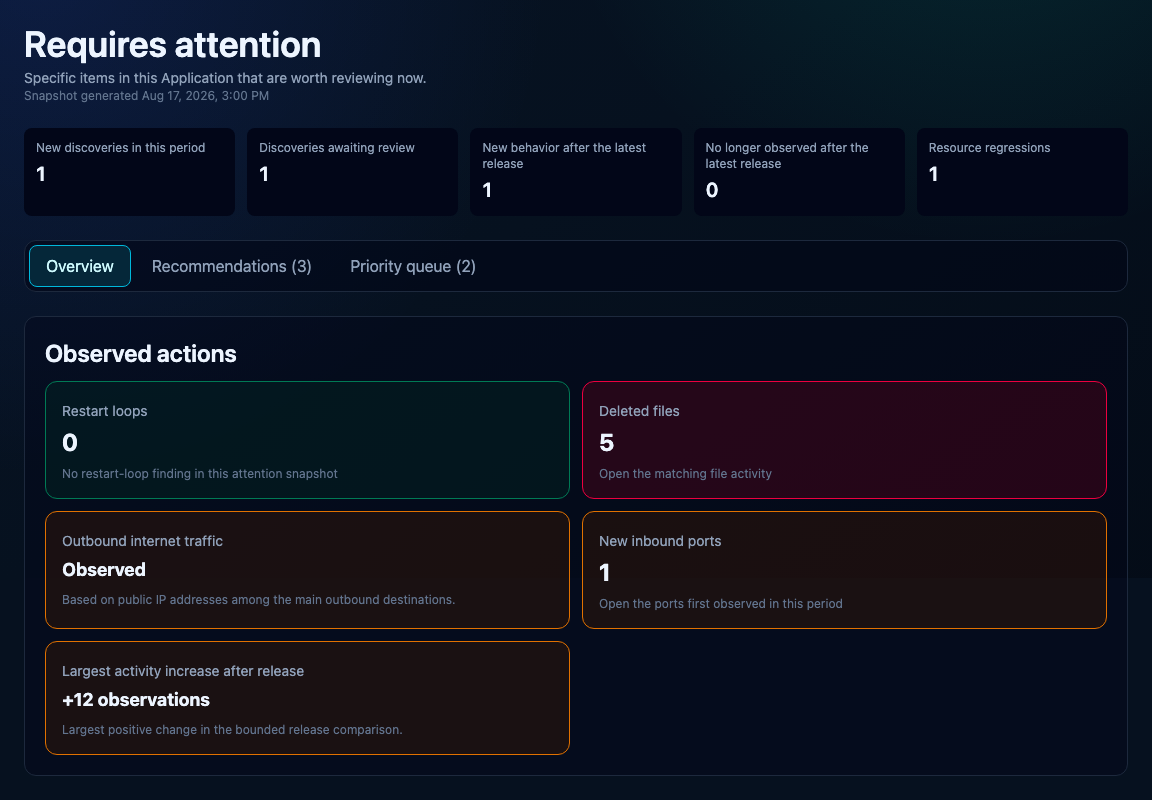
Requires attention in the example Application Gateway. The counters are entry points into the evidence, not verdicts.
Your workspace
Section titled “Your workspace”Organization — decides who owns the data and who is allowed to see it.
Project — keeps related Applications together.
Application — is the component whose runtime behavior you are looking at.
Cluster — is one Kubernetes installation.
Workload — is the Deployment inside that Cluster the agent watches.
Event — is a single thing the agent saw.
Runtime group — collects the events that describe the same behavior.
Inventory — lists what was seen: executables, destinations, file paths.
Release — is a set of deployed images together with how they behaved; it is not a source-code diff.
Choose your starting point
Section titled “Choose your starting point”Choose Okoscope Cloud to use our server at https://okoscope.com: install only the agent in your Kubernetes cluster and send observations to https://grpc.okoscope.com:443. Choose Self-hosted to operate your own server, web interface and PostgreSQL with your own domains. Both paths require a compatible cluster; read Compatibility and limits before installation.