How it works
What happens between a workload running in Kubernetes and the evidence you read in the interface.
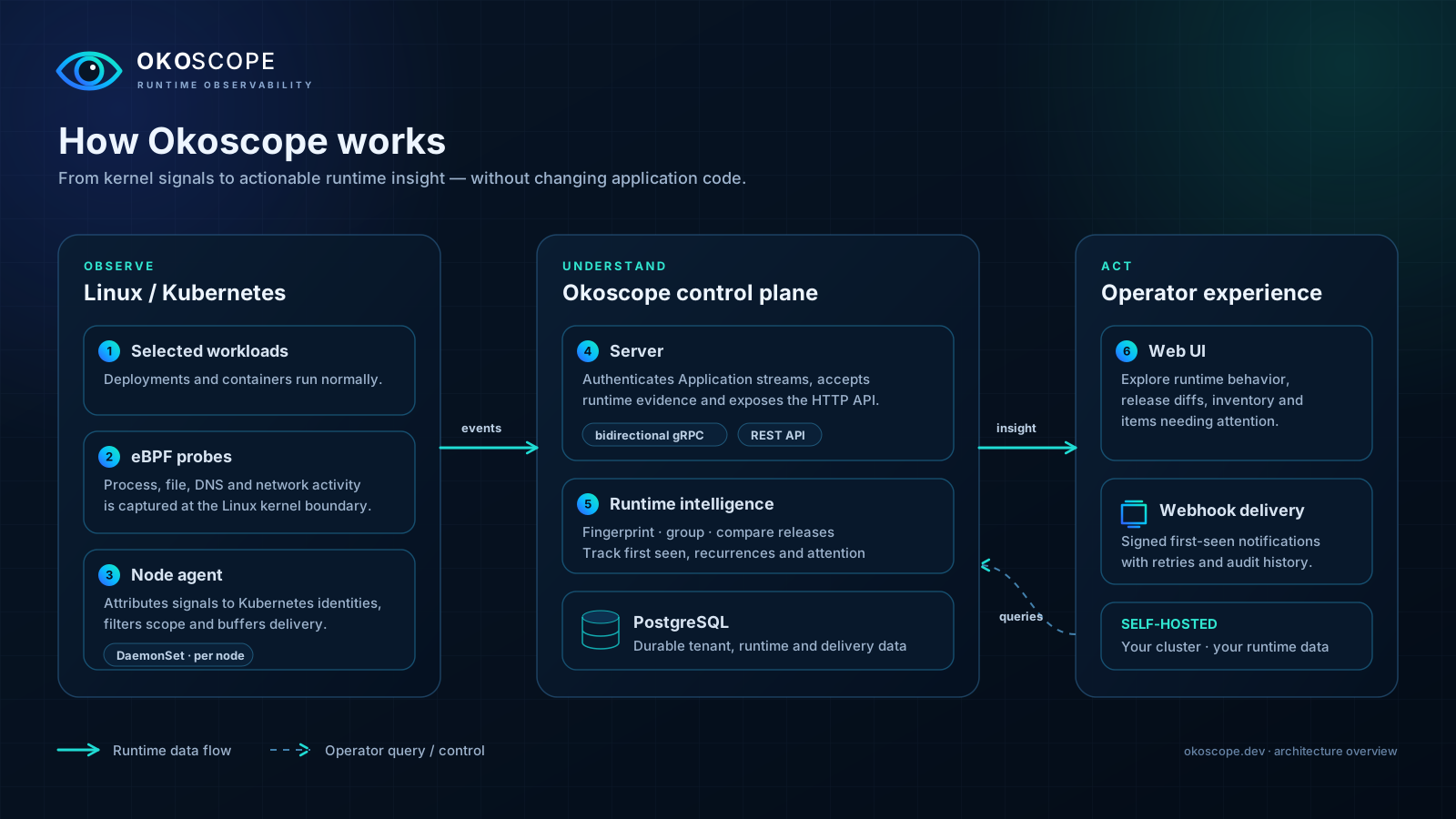
Agent → server → interface
Section titled “Agent → server → interface”On every node that takes part, the agent attaches eBPF probes and watches the event classes you enabled. Kubernetes metadata and cgroup information tell it which container and which Deployment-owned workload an observation belongs to. A workload is in scope only when it matches the namespace, kind, name and labels you configured, so everything else on the node stays outside.
What it sees goes to the server in bounded batches over gRPC, authenticated with an Application credential. The server checks the token and decides for itself which tenant and Application the data belongs to, stores the evidence in PostgreSQL and serves it through the API. The web interface never shows you anything except what the server returned.
Attribution and release identity
Section titled “Attribution and release identity”One node agent can serve several Applications at once, and each credential gets its own bounded stream. The cluster is identified by the UID of the kube-system namespace. Attribution follows the ownership chain Pod → ReplicaSet → Deployment, so a Pod owned by anything else is not a supported workload and will not show up as one.
For releases, the image digests reported by Kubernetes win; a release string set by hand is only a fallback. During a rolling update several images live side by side for a while, so before you conclude anything, check which release the evidence actually belongs to and which window it was observed in.
What a group tells you
Section titled “What a group tells you”A group keeps the identity of the behavior, how many times it was seen, and when it was seen first and last. Open it to look at the examples that are still stored and at the workload context around them. An inventory row is something that was observed, not the result of an audit: it is not a list of installed software, and it is certainly not every file on disk.
What you can see depends on aggregation, the filters in your configuration, rate limits and retention. Details can expire while the historical count stays above zero, so a group with a number but no examples is normal. And an empty list means nothing was retained for that scope, not that nothing happened.